Integrate QuickBooks Online and your Pool Office Manager software for the initial setup.
Seamless Sync between POM and QBO: Customers, Items, Invoices and Payments
- If you have existing data already in POM and connecting to QuickBooks Online the first time, it is recommended you Backup your QuickBooks Online before starting: https://quickbooks.intuit.com/learn-support/en-us/back-up-data/back-up-and-restore-your-quickbooks-online-advanced-company/00/482774
POM performs backups daily at 2am and 2pm Eastern Time. We can restore POM Data to any point for a rolling 60 days. We CAN NOT restore your QuickBooks Data - Setting > Customer billing
Connect With QuickBooks, log in, and approve access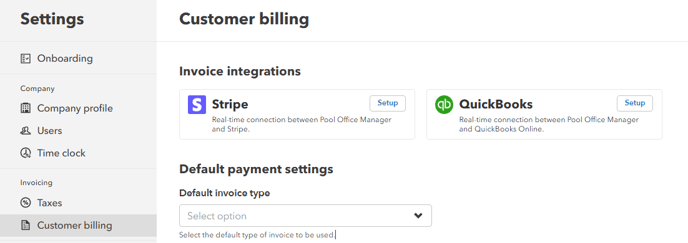
- Configure your QuickBooks Settings:
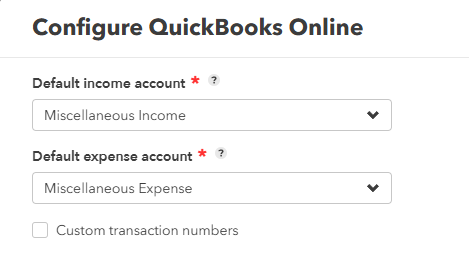
- If you are creating a new item in POM that hasn't been created in QuickBooks, these settings will be applied as needed to configure the QuickBooks item with the appropriate accounting details.
- Custom Transaction Numbers, if checked, will not use the next invoice number automatically, these will be blank
- You can now begin creating invoices. Create an invoice from the customer profile or the billing page. Once the invoice is generated, the invoice will be automatically synced with your QuickBooks Online.
Changes in Customer Profiles will sync to either platform
Changes in Items and Inventory will sync to either platform
Payments, Invoices are instantly synced between platforms
Sync Details
1. Syncing takes place whenever you save or update a client profile or item in either platform. This includes the creation of invoices and the receipt of payments.