When you connect your QuickBooks Online account to Pool Office Manager, you’ll be asked to select two required fields:
-
Default Income Account
-
Default Expense Account
These are only used for new services or items you create within POM — not for existing items already in your QuickBooks account or any new ones created directly in QuickBooks.
Even if you're not currently using inventory or tracking costs this way, QuickBooks requires a selection here to complete the connection.
What Is a Default Income Account?
The Default Income Account is where QuickBooks will categorize revenue for any new items or services you create within POM. It’s required during setup so QuickBooks knows where to file those earnings when POM syncs them over.
This account:
-
Applies only to items created in POM.
-
Does not affect items already in QuickBooks or added later in QuickBooks.
-
Can be overridden for each item if you later assign a specific income account.
Examples of income accounts you might use:
-
Services -
Pool Service Income -
General Sales
👉 Don’t overthink it — choose an account that generally matches your type of work. You can always adjust item-level accounts later.
✅ What Is a Default Expense Account?
The Default Expense Account is used to categorize costs (like chemicals or parts) when you create new inventory items in POM.
This account:
-
Applies only when creating new inventory-type items in POM.
-
Won’t affect any item already in QuickBooks.
-
May never be used unless you're tracking COGS or inventory items through QuickBooks.
Examples of expense accounts:
-
Cost of Goods Sold -
Pool Supplies -
Chemicals
📌 Even if you're not currently using inventory or tracking costs this way, QuickBooks requires a selection here to complete the connection.
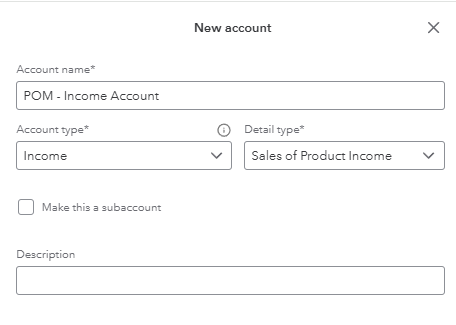
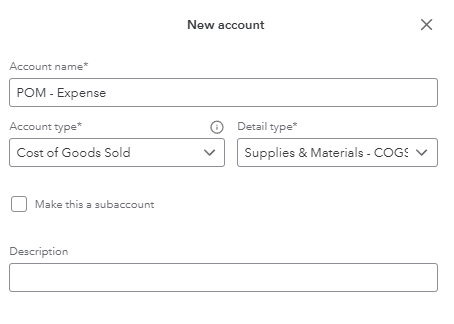
🛠 Creating a Custom Account in QuickBooks Online
Want to keep things organized? You can create new accounts just for POM:
-
Go to QuickBooks Online > ⚙️ Gear Icon > Chart of Accounts
-
Click New
-
Choose:
-
Account Type:
IncomeorCost of Goods Sold -
Detail Type: Match your business needs
-
Name: e.g.,
POM Income,POM Chemicals
-
-
Save the account and select it during setup in POM
Example:
Income Account
Expense Account:
💡 What If You’re Not Sure What to Choose?
No problem. Our recommendation to use a Miscellaneous account or create your own:
These are general-purpose accounts and can be changed later.
Final Reminder
✅ These defaults only apply to items or services created in POM that do not yet exist today.
❌ They do not apply to:
-
Existing items already in QuickBooks
-
New items you create directly in QuickBooks