Service types and service report templates work hand in hand: the service type defines what a job is and how it's priced, and the template linked to it defines what your technician sees and fills out on-site. Set them up together and every appointment gets the right pricing, presets, and paperwork automatically. This guide covers both.
Part 1 — Service Types
Service types in Pool Office Manager define your service offerings with pre-configured defaults. This guide explains how to create and configure service types.
Accessing Service Types
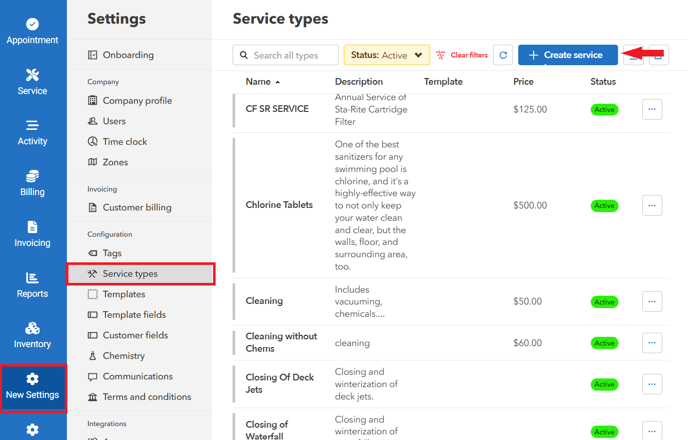
Go to Settings then Service Types to view and manage your service offerings.
Creating a Service Type
Click "Create service type" and configure the following settings:
Service Details Tab
- Name: The service name (e.g., "Weekly Cleaning", "Acid Wash")
- Description: Detailed description (up to 4000 characters)
- Template: Link to a service template for technician forms
Billing Options
Choose from three billing methods:
- Fixed Price: Flat rate regardless of duration or workers
- Hourly (per duration): Based on how long the service takes
- Hourly (per worker): Based on duration multiplied by number of workers
Additional billing settings:
- Base price
- Taxable toggle
- Round up time (for hourly billing)
- Minimum billable hours
- Service call fee option
Appointment Presets Tab
Configure default values for appointments:
- Duration (e.g., 4 hours)
- Priority level (Normal, Special, etc.)
- Color for calendar display
- Default billing status
- Pin to unassigned queue option
- Notes for Customers (visible to customer)
- Private Notes (internal only)
- Default Workers assignment
- Default Inventory Items with quantities and prices
Linking Templates
Each service type can be linked to a specific template. When technicians start a job of this type, they will see the associated template form.
Common Service Types
- Weekly Cleaning
- Bi-weekly Cleaning
- Monthly Service
- Acid Wash
- Filter Clean
- Equipment Repair
- Opening/Closing
- Water Testing
Best Practices
- Create consistent naming conventions
- Set appropriate default durations
- Include relevant inventory items as defaults
- Use color coding to distinguish service types on the calendar
Step-by-Step with Screenshots
- Go to "Settings" > "Service Types" > Click "Create service"
- Input the Name, Description, and Price of the service type.
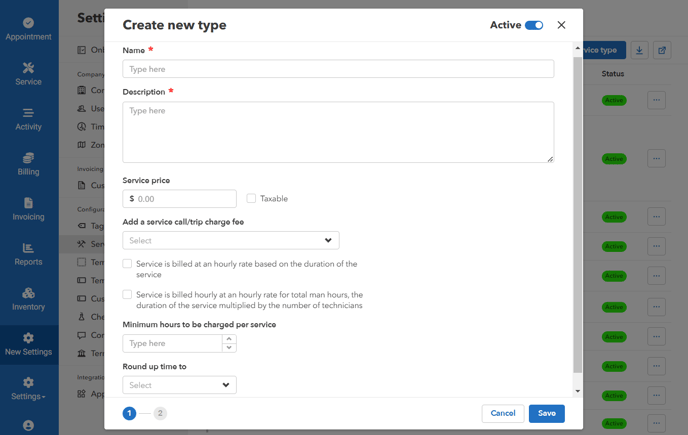
Taxable - applies tax to the price of this type.
Service call/trip charge fee - Allows you to assign a service call fee to this type of service
Minimum hours to be charged per service
Round up time - Add Details, Workers, and Inventory Items
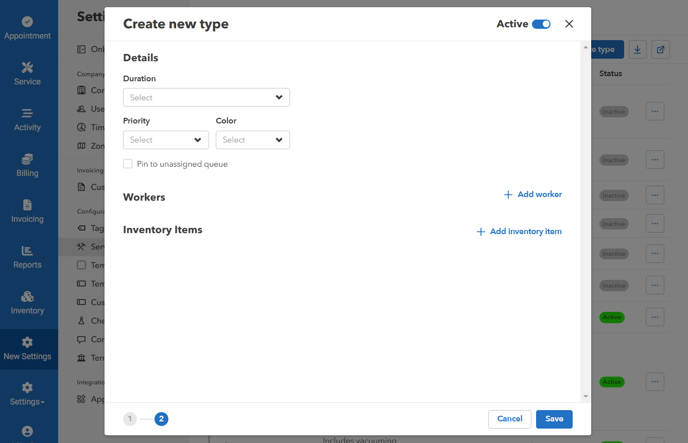
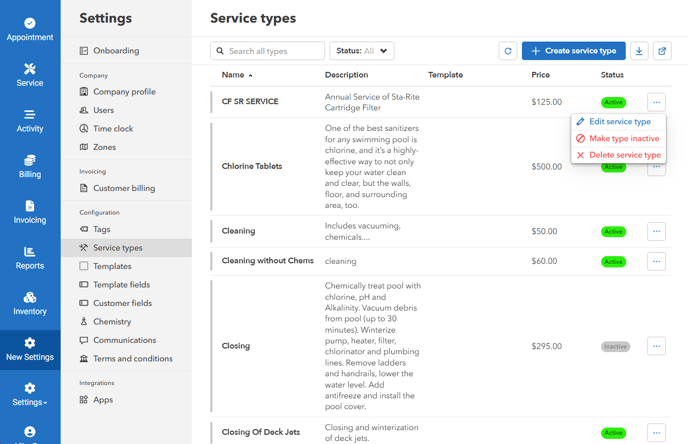
To make a service type active/inactive
- Click on the ellipsis icon > "Make type inactive/active"
Part 2 — Service Report Templates
Service templates in Pool Office Manager define what technicians see and fill out during a job. This guide explains how templates work and how to customize them for your business.
What Are Templates?
Templates are multi-page forms that technicians complete when performing service visits. Different service types can use different templates, allowing you to collect the right information for each type of job.
Template Structure
Each template can have up to 10 pages. Common page types include:
Page 1 - Job Start Information
- Technician assignment
- Secondary technician (if applicable)
- Service type
- Start time
Page 2 - Service Checklist
- Skim surface
- Empty baskets
- Brush walls
- Vacuum
- Check water level
- Water condition and color
Page 3 - Water Chemistry
- pH level
- Chlorine (free and combined)
- Alkalinity
- Calcium hardness
- Cyanuric acid
- Salt level
- Phosphates
- Total dissolved solids
- Water temperature
Page 4 - Chemical Adjustments
- Suggested chemical treatments based on readings
Page 5 - Completion
- Inventory used
- Customer notes (visible to customer)
- Private notes (internal only)
- Service status
- End time
- Photos
Field Options
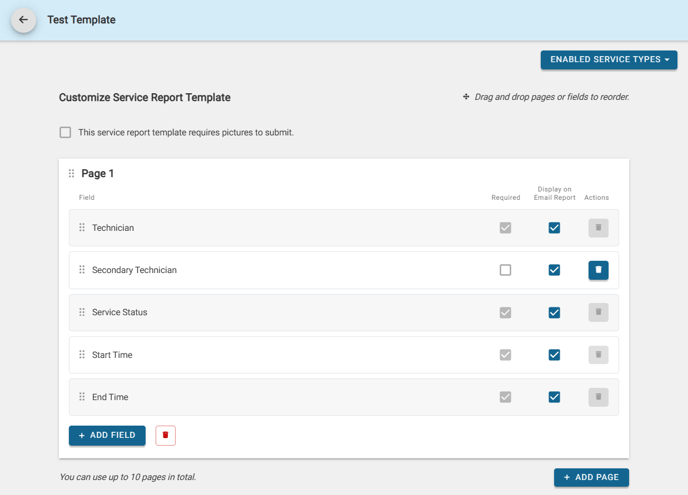
For each field in a template, you can configure:
- Required: Must be filled before job can be submitted
- Display on Email Report: Include in customer-facing service report
- Field order via drag-and-drop
Accessing Templates
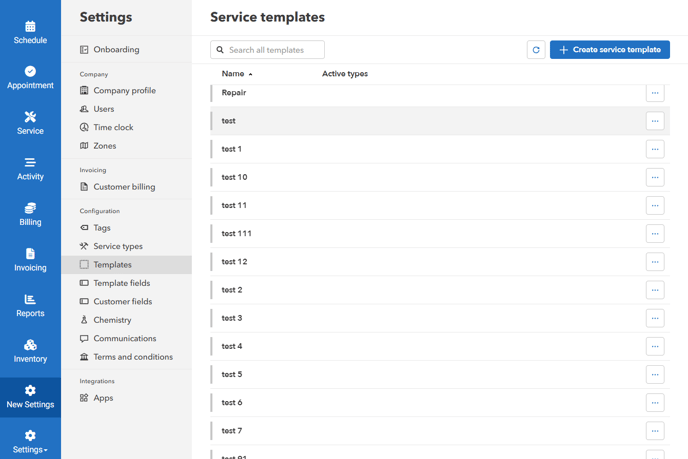
Go to Settings then Templates to view and edit your service templates. You can:
- Create new templates
- Edit existing templates
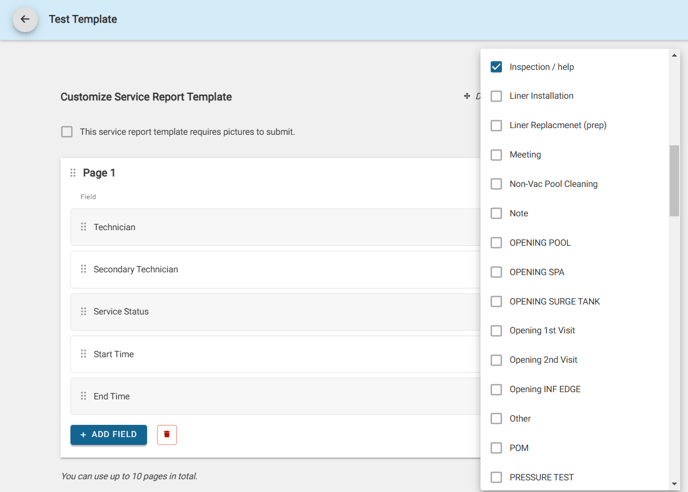
- Link templates to specific service types via "Enabled Service Types"
- Set "Requires pictures to submit" option
The Default template includes 5-6 pages covering standard pool service needs. You can create specialized templates for different services like Labor, Chlorine Pool, or Pool with Spa.
Creating and Editing a Template
- Go to "Settings" > "Templates" > click "Create service template" or an existing template
-
Drag and Drop into the correct order, add fields or remove them, select whether to make them required for the user in the field, and if you'd like to include them in the emailed service report
Assign a template to a service type
- Select Enable Service Types to use the template for all appointments/services of that service type

Custom Template Fields
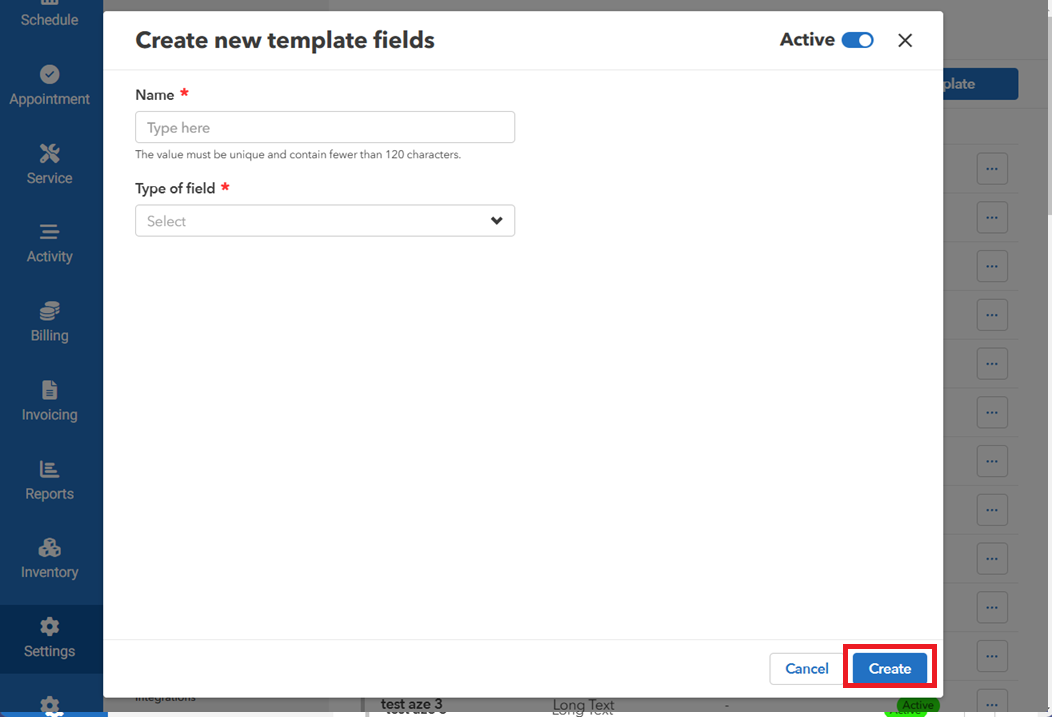
Create a custom template field- Go to "Settings" > "Template fields" > click "Create template field"
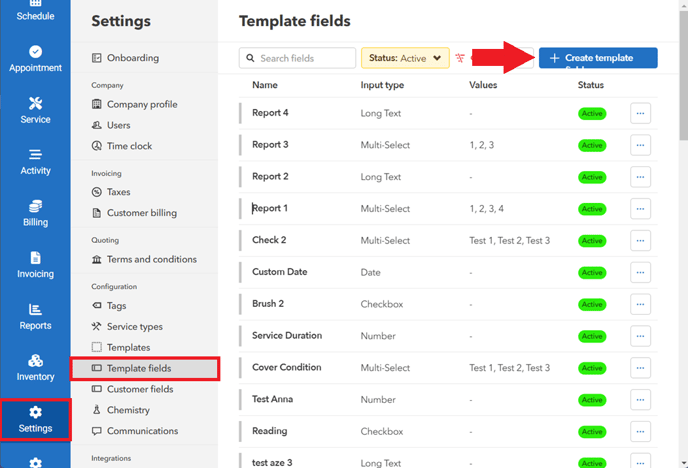
- Enter the name and select the type of field (This can be a checkbox, Date, Text, or Number). Click "Create" to save the new template field.
Activate/deactivate or delete existing template field
- In the list of template fields, find the specific field you want to modify. You can search the field or filter the list of template fields by pressing the "Status" dropdown menu.
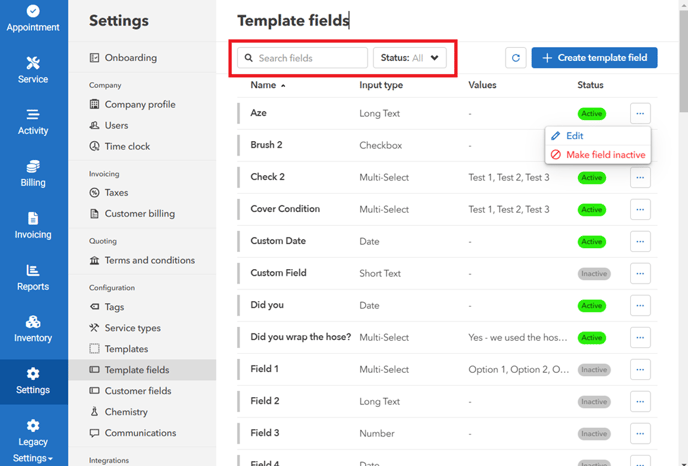
- Locate the "Status" column, If the template field is currently active. Click the "Make field inactive". Do the same for inactive template fields.
- A confirmation message will appear. Click "Make active/inactive" to proceed with the changes.
- To make edits, click on the "Edit" icon. After making your changes, be sure to click "Save" to apply them.
Template FAQs
Can I customize what shows on a service report? Yes. Service report templates control what fields technicians fill out and what customers see on the final report. Do templates affect pricing or inventory totals? No. Templates only control visibility and data entry. Pricing and inventory are handled separately through inventory and billing. Should I use custom fields or inventory for chemicals and parts? Use inventory for anything you bill or track quantities for. Custom fields are best for notes or information that isn’t tied to cost. Can I change chemical targets or measurements in the template? Chemical values are guided by the system’s algorithm. Changing them impacts calculations based on what you set. What’s the difference between technician notes and customer notes? Technician notes are internal. Customer notes appear on emailed service reports. Use a long text field if technicians need more space. Can I remove or rename fields later? Yes. Templates can be edited anytime. Changes only affect future reports.
Related: Flat-Rate Packages & Subscription Billing (uses a dedicated service type), Completing a Service Visit.