Photos can be uploaded to a customer profile from both the field and the office using the mobile app or a computer. These serve as valuable documentation, capturing equipment details, the overall pool condition, and the results of services performed, including "before and after" comparisons.
- Go to customer's profile > Click "Note"
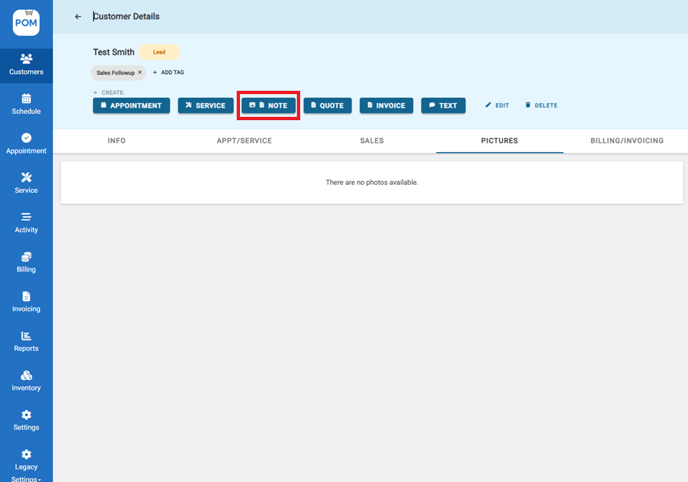
- Go to the last page of the notes. Select and upload the desired photo. Add a brief description for reference (optional).
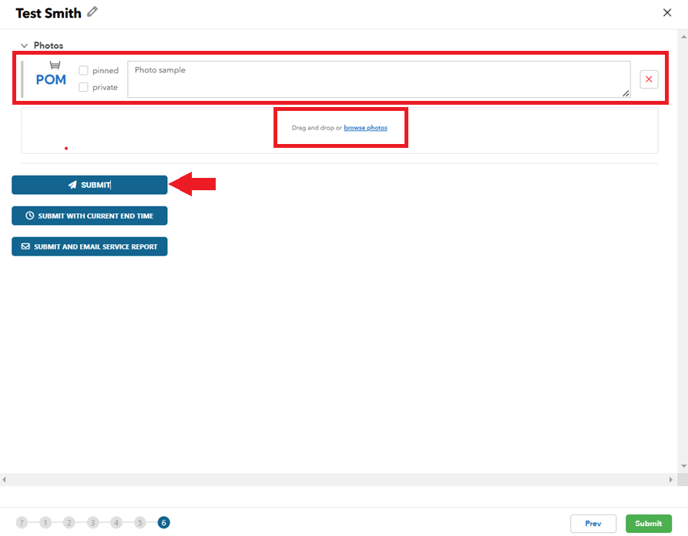
Pinning a photo keeps it visible at the top of the pictures tab when viewing a customers profile. Useful for frequently referenced images (e.g., equipment pad pictures, keypad locations).
Photos are automatically included in reports unless marked as "private."
To have all pictures automatically private go to > Settings > Company Profile > Visual Cues > check the check box for Automatically set photos to private by default > Save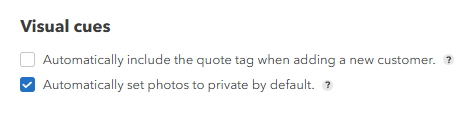
- All uploaded pictures can be seen on the 'Pictures' tab in a customer profile.

Troubleshooting Photo Uploads
- Upload from gallery failing: update the app to the latest version first, then check the phone's permission settings allow POM full access to Photos.
- Large photos: very large images can time out on cellular — retry on WiFi.
- Only one technician affected: compare their app version to everyone else's; version mismatches are the usual cause.
- Photos upload but don't appear in emailed service reports: that's a different issue than profile uploads — if you can see photos in the browser but not the emailed report, contact support (help@poolofficemanager.com) with the customer and report date. See also Reporting a Problem or Bug.