The new Billing List page retains the familiar layout and functionality of the previous version while introducing a significant addition:
-
Estimated Total: You will now see a new Estimated total column on the list. This column displays a non-taxed subtotal for each service, giving you a quick estimate of the revenue generated before taxes and additional fees are applied.
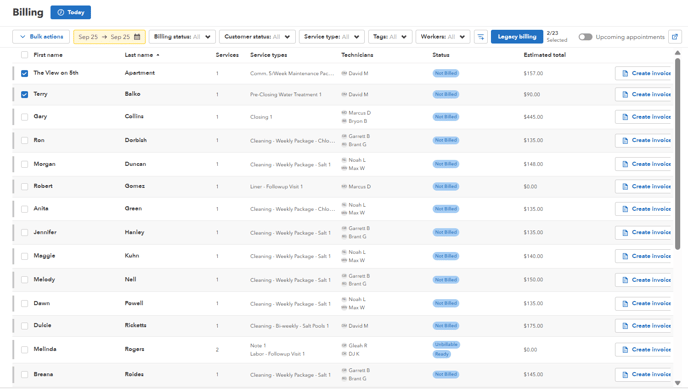
A new Export data button has been added to the top right of the page. This feature allows you to quickly and easily export your billing data for use with other applications or for record-keeping.

To create an invoice for QuickBooks Desktop: https://43687554.hs-sites.com/qb-desktop-invoicing
Billing Page FAQ
- Which services appear in the line-item dropdown? Active service types and inventory items. If something's missing, check it's Active under Settings > Service Types (or Inventory).
- A job shows "Not Ready": the service hasn't been completed and marked billable yet — once the technician completes it (and it syncs from the app), it becomes ready to invoice.
- Line-item type resets after adding one item: re-select the type for each line. If the type keeps vanishing mid-invoice, that's worth reporting — see Reporting a Problem or Bug.
- Invoice list sorting looks wrong / year missing: click the date column to re-sort; if dates display without the year or sort incorrectly, report it with a screenshot.