Install the App
- On your device, go to the Google Play or App Store and download ‘Pool Office Manager’
Apple: https://apps.apple.com/us/app/pool-office-manager/id1379907117
Android: https://play.google.com/store/apps/details?id=com.PoolOfficeManager&hl=en_US&gl=US
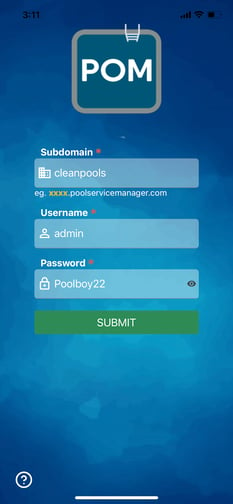
-
For subdomain, enter the subdomain of your companies URL:
xxxxx.poolservicemanager.com
-
Example: cleanpools.poolservicemanager.com would enter in “cleanpools”
-
-
Then enter your user name and password assigned. The username is not an email address.
-
Press Submit to access the software
Reset Password
-
Navigate to your company’s URL at xxx.poolservicemanager.com
-
Select Forgot Password and follow the prompts.
View this article to see how technicians can use the app.
Login Checklist (read this first)
Almost every login problem comes down to one of these three things:
- Your company subdomain must be all lowercase, with no spaces. If your company URL is yourcompany.poolofficemanager.com, type it exactly that way — capital letters or spaces will fail.
- Use your username, not your email address (unless your admin set them up to be the same). Usernames are set in Settings > Users.
- Update the app to the latest version before troubleshooting anything else. Older versions frequently fail to log in after updates.
Still stuck? Your admin can reset your password (see How to Reset User Passwords), or contact support at help@poolofficemanager.com.