Pool Office Manager is billed month to month, per active user, in arrears — you pay at the end of each billing cycle for the users you had during it. This article explains what counts as a user, how the monthly total is worked out, when the charge happens, and how to keep the bill down in the off-season.
What you pay
There is one plan. Every feature is included; the price depends only on how many people at your company use the software.
| Item | Monthly price |
|---|---|
| First user | $125 — this is the base charge for the account |
| Each additional active user | $25 |
| 12 or more users | Contact us for a fleet rate |
So two users is $150 a month, four users is $200, and a company with ten technicians is $350. There are no setup, onboarding or data-migration fees, and no charges per customer, route or job.
Optional add-ons are billed on the same invoice: QuickBooks Online sync (+$25/month), customer text messaging (from $10/month for your texting number, plus usage) and extra video storage (from +$25/month, managed under Settings → Add-ons). Card and ACH payments you take from your customers go through Stripe at Stripe's standard processing rates — that's separate from your POM subscription.
Prices here are current as of November 2026. The pricing page is always the up-to-date source.
Who counts as a user
A user is anyone with their own login — office staff and technicians alike. Each one is either Active or Inactive:
| Active | Inactive | |
|---|---|---|
| Can log in | Yes (web and tech app) | No |
| Can be scheduled | Yes | No — they drop out of the assignment lists |
| Counts toward your bill | Yes | No |
| History | Kept either way. Past services, reports and time-clock entries stay on the account; an inactive user can be made active again at any time. | |
You never need to delete a user to stop paying for them — make them inactive instead (steps below).
How the monthly count works
POM doesn't bill on how many users you have today. It watches your account through the whole billing cycle and records the highest number of active users at any one time during that cycle. That peak is what you're invoiced for.
Two examples:
- Your cycle starts with 4 active users. Ten days in you hire someone and add their login (5 active). A fortnight later someone quits and you make them inactive (back to 4). The peak for the cycle was 5, so that cycle's bill is for 5 users — $225.
- Your cycle starts with 8 active users. Halfway through, an employee leaves and you make them inactive. You now have 7, but the peak for the cycle was 8, so that cycle is billed for 8. The next cycle, if nothing else changes, is billed for 7.
The practical rule: a user you add mid-cycle is on that cycle's bill; a user you make inactive mid-cycle comes off the next cycle's bill. Changes always take effect on the following invoice, never the current one.
When you're charged (billing in arrears)
Billing is in arrears, which means each invoice covers the month that has just finished:
- Your billing cycle is a month long and runs from the day of the month your account started — for example Oct 31 to Nov 30. The exact dates are shown on your Users page (below).
- When a cycle closes, POM emails your invoice for it — the peak user count for that cycle, plus any add-ons.
- A few days later the card on file is charged automatically. The gap is on purpose: it gives you time to look the invoice over and get in touch if something doesn't look right before the payment runs.
Your account is on autopay from your first payment onward. If you signed up on a free trial, nothing is charged until the 30 days are up, and you can cancel before then at no cost. There's no contract — you can cancel any month, and your last invoice simply covers the final month you used the software.
Check your counts in POM
You don't have to wait for the invoice to know what it will say. Click Settings at the bottom of the left-hand menu, then Users. The three boxes at the top show:
- Active users — how many are active right now.
- Current billing cycle — the dates of the cycle you're in and the peak count so far. This is the number your next invoice will be based on (it can only go up until the cycle ends).
- Previous billing cycle — the peak for the cycle that just closed, which is what your most recent invoice was for.

Only Admins can see the Users page.
Make a user inactive or active
- Go to Settings → Users.
- Click the ··· menu at the right-hand end of the user's row.
- Click Make user inactive, then Inactive to confirm.
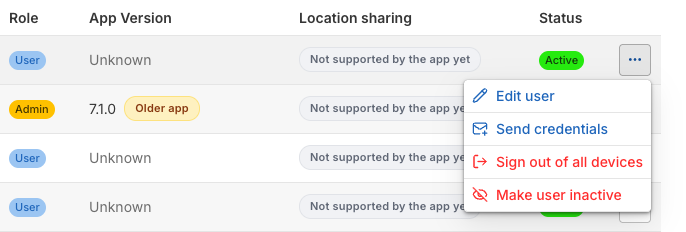
The user is signed out and disappears from the Active list. To bring someone back, change the Active filter above the list to Inactive, open the same ··· menu and click Make user active. Remember that making a user active raises this cycle's peak the moment you do it, so it's on the next invoice.
Before you make a technician inactive, reassign any upcoming appointments and routes still on their name so nothing goes unscheduled.
Keeping the bill down in the off-season
This is why POM bills on active users rather than on logins that exist. If your crew shrinks for the winter:
- Make seasonal techs inactive on their last day. The first full cycle they're inactive, they come off the bill. If you can, do it just before your cycle date rather than just after — the cycle dates are on the Users page.
- Don't delete them. Their history stays, and in spring you make them active again in two clicks — no new login, no re-training on the app.
- Replacing a tech? Make the old login inactive before you add the new one. If both are active at the same time, even for an hour, the peak goes up by one for that cycle.
Common questions
I made a user inactive last week — why is the invoice I just got still for them?
Because that invoice is for the cycle that just closed, when they were active. They won't be on the next one.
We only used the software for a week this month. Is it prorated?
No. The charge is per user per billing cycle, whether they logged in once or every day. Make unused logins inactive and they stop counting from the next cycle.
Does an inactive user's past work disappear?
No. Everything they did stays on the customer records, service reports and time clock.
How do I update the card on file or ask about a different payment arrangement?
Email help@poolofficemanager.com and we'll sort it out with you.
Still need a hand? Email help@poolofficemanager.com or call 614-710-0074.