The Activity page provides a complete audit trail of actions performed within the system. It allows users to review timestamped records of changes made to appointments and GPS-based activities, helping track who performed an action, when it occurred, and what was changed.
Accessing the Activity Page
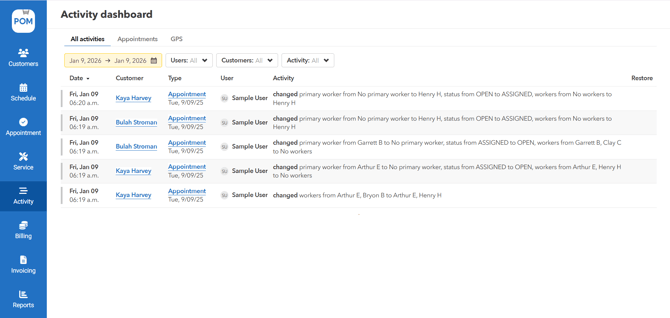
-
From the main navigation menu, click on Activity.
-
The system redirects you to the Activity Page.
Activity Page Overview
The Activity page displays a chronological list of actions such as appointment creation, updates, and GPS-related events. Each entry is time-stamped and reflects changes made within the system.
Activity Tabs
The Activity page contains three tabs:
-
All Activities
-
Appointments
-
GPS
Each tab displays activity logs based on the selected category.
All Activities Tab
The All Activities tab acts as a centralized view combining both Appointment-related and GPS-based activities.
Filters
The following filters are available:
-
Date Picker
Filters activities based on a selected date or date range. -
Users
Filters results by the selected worker or workers. -
Customers
Filters activities based on selected customer(s). -
Activity
Filters results by one or more activity types.
Activity Table
The table displays the following columns:
-
Date
-
Customer
-
Type
-
User
-
Activity
-
Restore
Restore Functionality
-
If an activity is deleted, the Restore column displays a recycle icon.
-
Clicking the recycle icon restores the deleted activity.
Appointments Tab
The Appointments tab displays only activities related to appointment creation, updates, and changes.
Filters
The same four filters are available:
-
Date Picker
-
Users
-
Customers
-
Activity
Activity Table
The Appointments activity table includes the following columns:
-
Date
-
Customer
-
Type
-
User
-
Activity
-
Restore
If an appointment-related activity is deleted, a recycle icon appears in the Restore column, allowing the activity to be restored.
GPS Tab
The GPS tab displays activities that are based solely on GPS data and map interactions.
-
This tab does not include appointment-related activity.
-
It is used to track location-based events captured through the system.